Monday, 1 December 2008

Location Shot For Male Model Photoshoot

Today i conducted my male model photoshoot in the meeting room on the very top floor of the upper teaching block. I chose to use this specific location in relation to the room having exclusive lighting and therefore i could adjust thel ighting on photoshop is nessessary, which would not affect the original lighting.

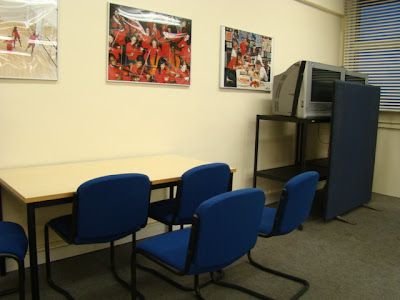
I also chose this location due to the background colour. Aiming to have a white backdrop turned out to be useful, as for when i edit my images, i could easily blend the image in with the background colour of the page of my magazine.

Friday, 28 November 2008

Schedule

My scedule for the upcoming week

Editing My Images

Yesterday at CLC i spent the lesson leraning how to mask my images, therefore removing the background. This up coming week i will continue to edit all the photos that i have previously chosen to be issued in my magazine.On Monday, i will conduct my male model photo shoot, as well as proceed with taking an image of myself for my contents page. I will also try to reconstruct the editorial photo of my celebrity, by finding a model who can help me to recreate this image. The decision of recapturing and reconstructing the image of the celebrity was based on the concept that the internet version that i was going to use was far too small to edit out the background precisely and accurately.

This is the image of the celebrity that i was previously going to use before i made changes to my final decision.
Photoshop Instructions

'click' on 'edit in quick mask mode'

Use the brush tool to highlight the image with a red hue. After finished, erase out the sections that are not needed, then 'click' on the 'edit standard mode' and then go to 'select' and 'save selection'.

Tuesday, 25 November 2008

Continuation with the previous photo shoot (what next?) 25/11/08

Another problem that i have come across is finding a replacement male model, due to the previous one backing out, however i have found a new replacement and therefore will arrange a time suitable for him to be able to help conduct my final photo shoot.
All photo shoot images will be used for my double spread of the 'fashion' section in my magazine.

Monday, 24 November 2008

The Photos (Female Model) 24/11/08


I particularly like the additional balloons added to the photo to give it more of a dramatic effect as well as exaggerate the colours of her outfit.


From all the photos taken today, i have chosen a few that i like and think would work best for my double spread. I still have a few more decisions to make, especially if i have chosen two similar photos containing the same outfit.

Model Profile 24/11/08

Today i conducted the photo shoot with my featured female model.


Malalika Carr
When conducting my photo shoot, originally i had thought about and made decisions on asking a friend to help me to create my photos, as she was going to be my main model, however a few changes occured during this process and i was forced to make changes towards my 'fashion' and 'front cover' pages.
At the moment i was able to get hold of my female model but due to a few problems faced, I was unable to gain a few photos of both the male and female models together; however this means that due to my front cover featuring both my male and female models, I will have to find a way of merging the two separate photos together.

Location Shot 24/11/08


Due to lack of spot lights and other equipment, i decided that it would be best to allocate my photo shoot at the top of the upper teaching block, where i had white walls as my backdrop and dimmed lighting to create a dark effective with the contribution to the bright light contrasting from beyond the windows.